A list or task is missing
Check the connected Google account, selected lists and current view. Refresh and confirm the task exists in Google Tasks.
 Agenda Widget
Windows 10 & 11 · Setup guide
To keep Google Tasks on a Windows 10 or 11 desktop, either install tasks.google.com as a browser app for a separate window, or use a desktop widget. Agenda Widget shows selected Google Tasks lists and Google Calendar events in one desktop timeline with two-way sync.
Try Agenda Widget in Microsoft Store7-day free trial · One-time purchase
See the current price in Microsoft Store.
Updated
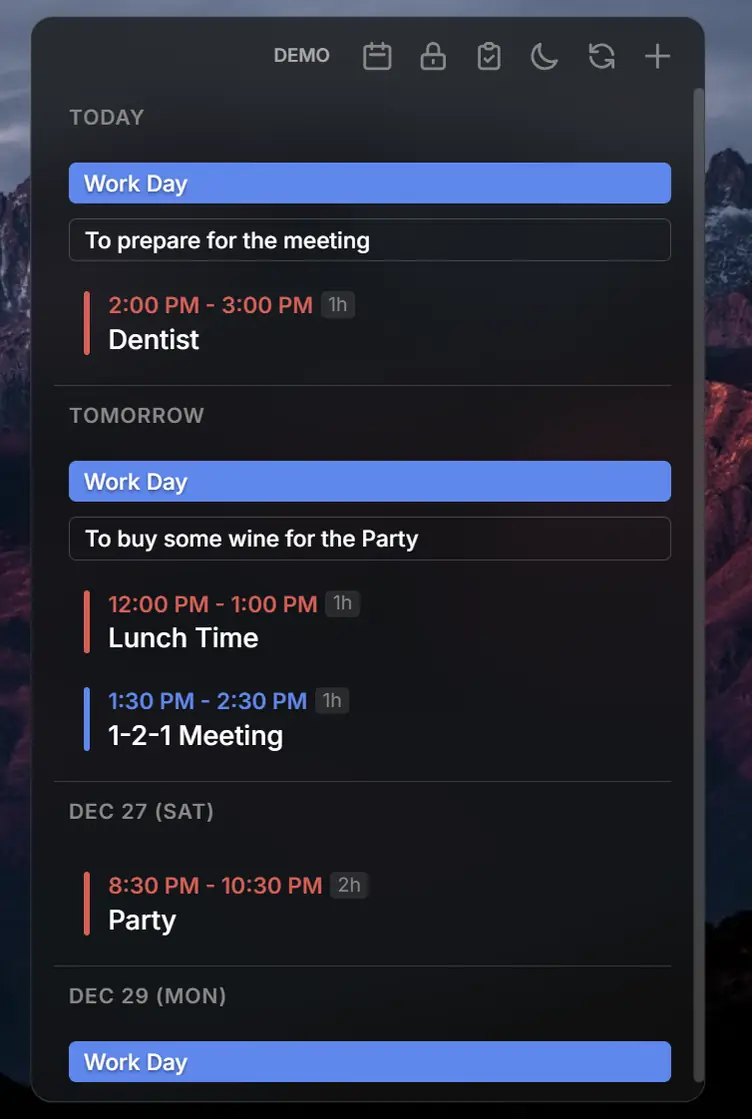
Agenda Widget is a separate Windows app that displays selected Google Tasks lists in a desktop timeline. It can also show Google Calendar events in the same view. Supported task changes sync back to Google Tasks.
Explore the interactive Google demo before installing. It uses sample data and does not connect to your accounts.
Agenda Widget is made by the publisher of this page. If you only need an occasional separate window, the browser app is enough.
Open the Microsoft Store listing on your Windows 10 or 11 PC and install the trial. Launch Agenda Widget.
Choose Connect Google and complete Google's authorization in your browser. Review the requested permissions before approving access.
Return to the widget and select the Google Tasks lists you want to display. Check that the account and lists match those you use in Google Tasks.
Create, edit, reschedule, or complete a supported task in the widget, then check it in Google Tasks. Internet access is needed to synchronize changes.
Select your most useful lists and calendars to keep the timeline readable. Use Google Tasks for features the widget does not expose.
Need the full connection walkthrough? See how to connect both accounts.
Sign in on the provider's authorization page, rather than entering your password into the widget. Read the privacy policy for details about account data and permissions.
Check the connected Google account, selected lists and current view. Refresh and confirm the task exists in Google Tasks.
Still need help? Contact Agenda Widget support.
Yes. Install Agenda Widget, connect Google, and select the task lists to display on your desktop. Windows 10 is also supported.
Supported task changes synchronize with the connected Google account.
Recurrence cannot be created or edited in the widget, because the public Google Tasks API does not expose it. Manage repeating tasks in Google Tasks.
Yes. After a one-time authorization in the browser, Agenda Widget shows the selected lists directly on the Windows desktop.
It has a 7-day free trial and a one-time lifetime license with a base price of $9.99, with no subscription. Microsoft Store shows your regional price.
Install, try, and buy through Microsoft Store.
Also use Notion? Sync Google Tasks with Notion.
Next guide: See calendar events and tasks together